



Android app · UZYTAK Handover
Contract and handover, signed on the phone
Write the work contract at the client's kitchen table, add change orders as the job goes, and close it with an acceptance protocol — defects, photos and a deadline for fixing them. Both sides sign with a finger, and the client gets a PDF on the spot.
- Free: unlimited drafts and PDFs
- 3 signed documents a month free
- No subscription
- No ads, no account
- Data stays on the phone
★ Built first for our own renovation work
Android 8 or newer · Pro is a one-time purchase, no subscription
Inside the app
Made for work done at the client's place
Renovators and finishers
A clear contract before the first tile comes off, a change order when the client wants more, and a signed handover at the end.
Installers
Windows, heat pumps, solar, kitchens: the acceptance protocol with photos and defects protects your final payment.
Electricians and plumbers
Small jobs need paperwork too — two minutes on the phone instead of a printed form in the van.
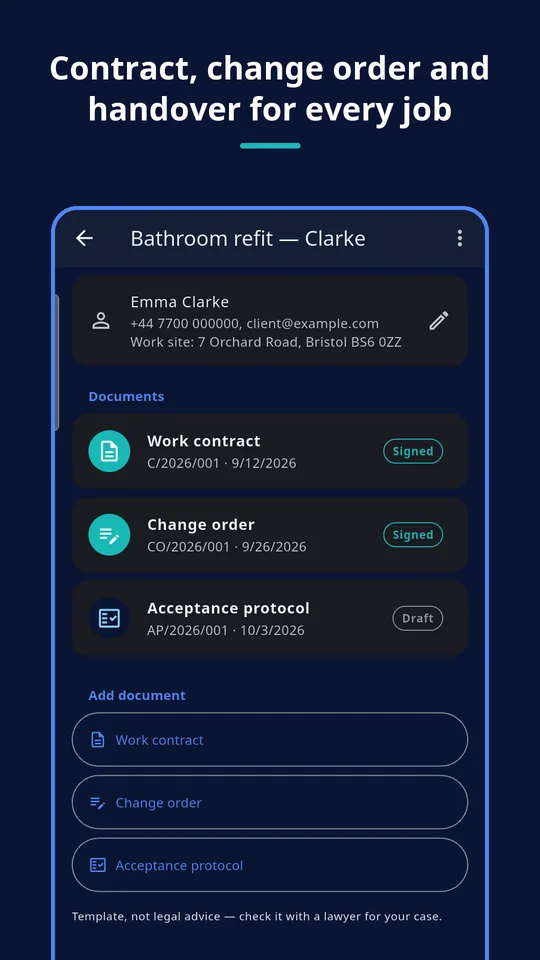
Three documents for every job
Each job keeps its documents together, with running numbers per document type and year. The PDF is written in the language you choose — Polish follows Polish law, the other languages the EU directive wording.
Work contract
Scope of work, price and VAT note, start and completion dates, payment terms, place. Choose contract for work or construction works.
Signed at the client's home
One switch adds the consumer information, the 14-day right of withdrawal and the model withdrawal form of EU Directive 2011/83 — plus the client's request to start early, if they want that.
Change order
Extra work or work left out, the price change with the new total, a new completion date. All other terms stay as signed.
Acceptance protocol
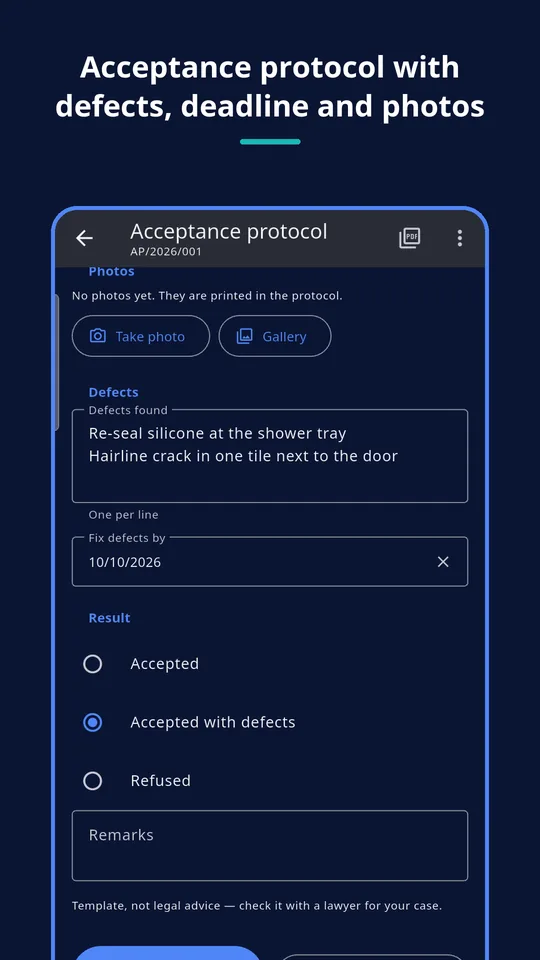
Items done, photos from the camera or gallery, defects with a deadline, and the result. It confirms the handover and protects your payment.
These are careful templates, not legal advice: have the wording checked by a lawyer for your country and your case.
Signed, sealed and shared
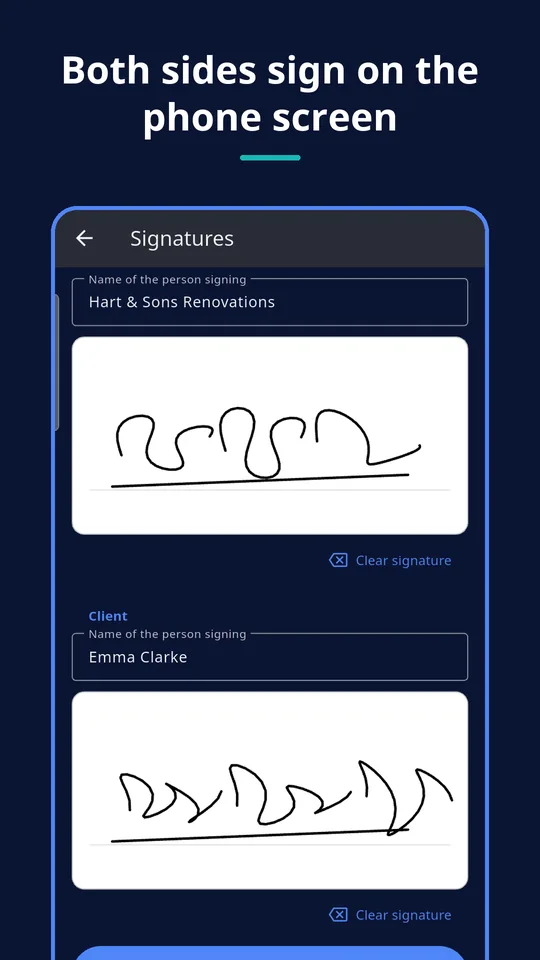
Signatures on the screen
Contractor and client sign with a finger. The names and the exact date and time are printed under each signature.
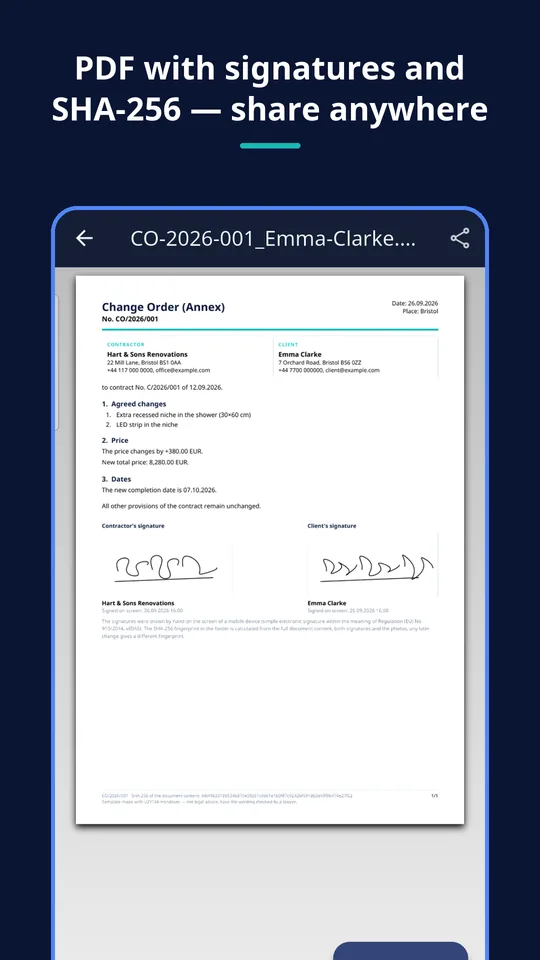
SHA-256 fingerprint
The footer of every signed PDF carries a SHA-256 of the whole content, both signatures and the photos. Any later change gives a different fingerprint.
Locked after signing
A signed document can't be changed by accident. The app shows whether the content is still exactly what was signed; unlocking removes both signatures.
Photos in the protocol
Take photos with the camera or pick them from the gallery — no storage permission needed. They are printed in the protocol.
Your business on every page
Name, address, tax number and contact from your profile, clients saved once. With Pro your logo is on every document.
PDF to anyone
Share the PDF by e-mail, messenger or printer straight from the app. Free PDFs carry a small “UZYTAK free” mark.
A contract the client can read
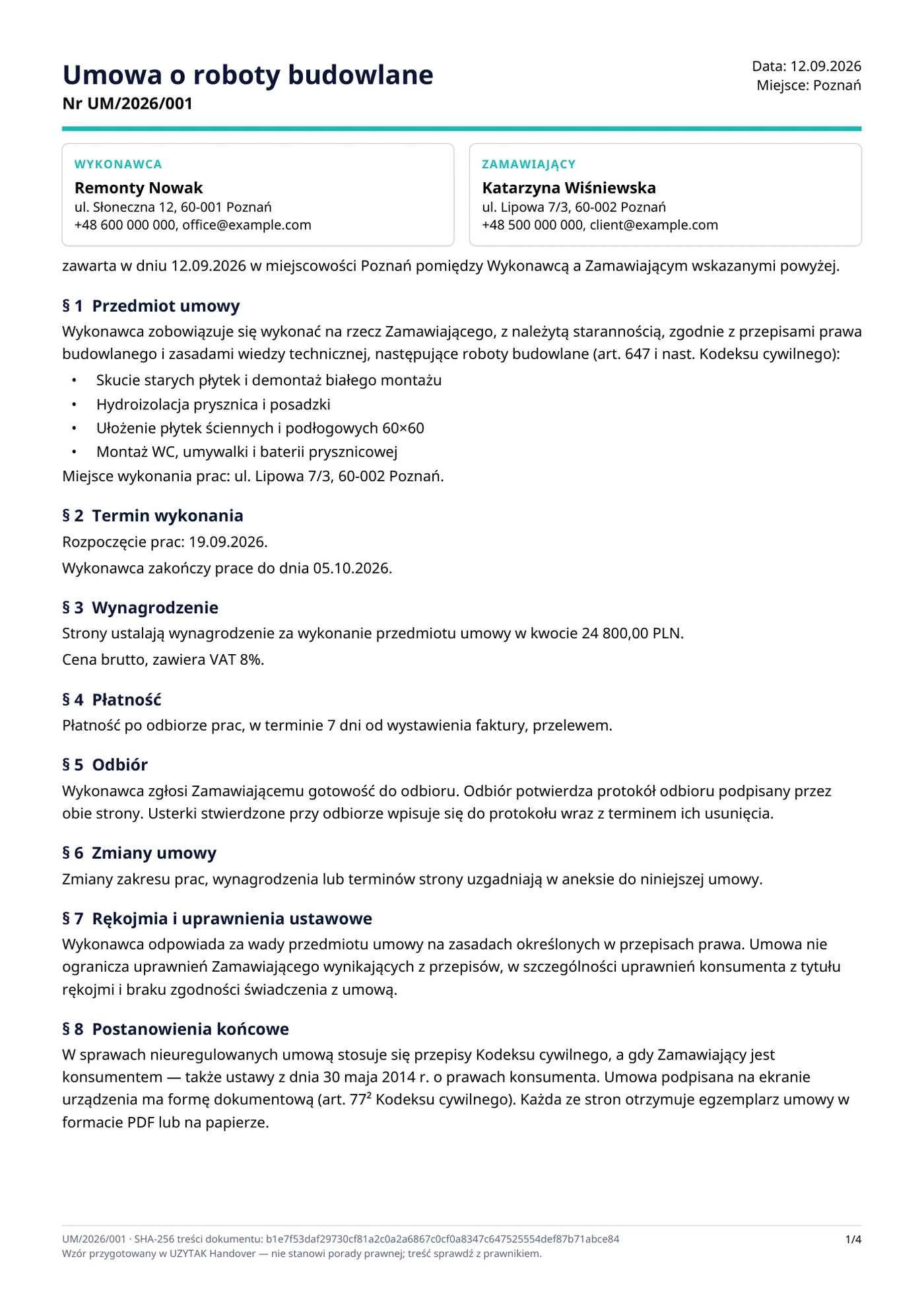
Every document is a clean A4 PDF:
- your business and the client side by side, number, date and place
- numbered clauses: subject, dates, price, payment, acceptance, changes, defects
- for contracts signed at home: consumer information and the model withdrawal form
- both signatures with the date and time of signing
- a SHA-256 fingerprint of the content in the footer of every page
PRO Pro removes the small “UZYTAK free” mark, adds your logo and lets you sign without a monthly limit.
How it works
Set up once
Your business details, then a client and a job — client, site address, title.
Write and sign
Fill in the contract, tick “signed at the client's home” if it is, and let both sides sign on the screen.
Hand over
At the end, the acceptance protocol with photos and defects, signed again. Share each PDF with the client.
Quoting first? Pair it with UZYTAK Job Price
UZYTAK Job Price turns work and material into a quote with your prices. When the client says yes, copy the scope and the price into the Handover contract and sign it on the spot.
What the app does not do
- It gives you templates, not legal advice. Laws differ between countries and cases — have the wording checked by a lawyer.
- A signature drawn on the screen is a simple electronic signature (eIDAS). It does not replace a handwritten or qualified signature where the law requires written form.
- The SHA-256 fingerprint shows whether a PDF was changed; it is not a qualified time stamp or a certificate.
- The Polish text follows Polish law; the other languages use the generic EU directive wording, not each country's national version.
- No cloud, no sync between phones and no e-mail sending from a server: you share the PDF yourself.
- No invoices — for that there is UZYTAK Faktura.
We would rather say it plainly than sell you something that does not fit.
Free vs. Pro
| Free | Pro | |
|---|---|---|
| Jobs, clients and drafts | unlimited | unlimited |
| Contract, change order, acceptance protocol | ✓ | ✓ |
| Consumer information and model withdrawal form | ✓ | ✓ |
| PDF export and sharing | ✓ | ✓ |
| Signed documents per month | 3 | unlimited |
| PDF without the “UZYTAK free” mark | — | ✓ |
| Your logo on the PDF | — | ✓ |
| Duplicate a job with all documents | — | ✓ |
| Price | free | €9.99 once |
Nothing is ever locked: documents signed in the free version stay in the app and can be exported again at any time.
Built for our own work first
Every UZYTAK app starts as a tool our own company needs in its everyday work. On our renovation jobs the paperwork was always the weak spot: a contract typed the night before, extra work agreed by phone, a handover nobody signed — and then a discussion about the last payment. Handover is the tool we made for that: the contract, the changes and the acceptance protocol, signed on the spot. We use it ourselves, and now you can too.
UZYTAK
Pay once. Use forever.
Signing apps usually want a monthly subscription, an account and your files in their cloud. UZYTAK Handover has no ads and no account, the free version makes every document, and Pro is a single payment in Google Play — no subscription, updates included. Google Play shows the price in your currency.
Free
- Unlimited jobs, clients and drafts
- All three documents and PDF export
- 3 signed documents a month
Pro
- Unlimited signed documents
- PDF without the mark, with your logo
- Duplicate a job
Like the app? Buy the team a coffee
UZYTAK is made by a small team of young developers. A small tip by card, PayPal or crypto keeps the free version free and without ads — coffee and croissants included.
Questions and answers
Is a signature on the phone screen legally valid?
It is a simple electronic signature under the EU eIDAS Regulation, and courts may accept it as evidence. Where the law requires written form or a qualified signature, it is not enough. This differs by country and case — ask a lawyer when in doubt.
What does “signed at the client's home” add?
For a contract with a consumer signed outside your business premises, EU law requires information before the contract and the 14-day right of withdrawal. The switch adds that information, the withdrawal instructions and the model withdrawal form to the PDF.
What is the SHA-256 fingerprint?
A code calculated from the whole document, both signatures and the photos. It is printed in the footer. If anyone changes a single letter later, the fingerprint no longer matches.
Is UZYTAK Handover really free?
Yes. Jobs, clients, drafts and PDF export are free without limits and without ads; the free version signs 3 documents a month and prints a small “UZYTAK free” mark. Pro is an optional one-time purchase.
Is Pro a subscription?
No. Pro is one payment in Google Play: €9.99, or the price Google Play shows in your currency. You pay once and keep it, with updates.
Where are my documents and signatures stored?
Only on your phone. There is no account and no cloud, and UZYTAK receives nothing. A PDF leaves the phone only when you share it yourself.
Which phones are supported?
Android 8 or newer.
Documents, signatures and PDFs are made on your phone, offline · support@uzytak.com · Privacy Policy