



Android app · UZYTAK Tools
Know who has which tool
Every drill, ladder and laser in one list on your phone: who took it, to which site, since when — and when it is due for inspection. Stick a QR label on it, and checking it out or back in takes two taps.
- Free up to 25 tools
- No per-user fees
- No subscription
- No ads, no account
- Works offline
★ Built first for our own crew
Android 8 or newer · the register lives on one phone, your crew does not need the app
Inside the app
Made for crews whose tools walk away
Crew owners
Three to thirty people, a few vans and several sites: you see at once who still has the core drill and which ladder never came back.
One-person firms
Serial numbers, photos, purchase dates and prices in one list — ready for the insurer or a police report if the van is broken into.
Equipment pools inside a firm
Mixers, scaffolding and generators lent to your own crews and sites: what is out, since when and when it is due back.
One register for everything you own
Every item gets a running number like T-0007, a category and a status. Crew members and sites are two simple lists, so a check-out is just: tool, person, site.
Tools and equipment
Name, category, brand and model, serial number, photo, purchase date and price, notes. Categories from power tools and ladders to vehicles and trailers.
Five statuses
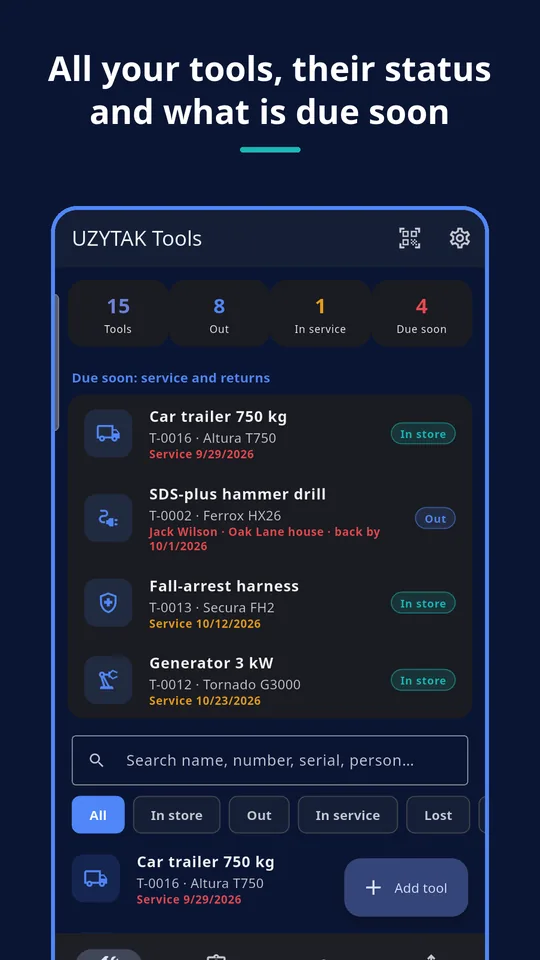
In store, checked out, in service, lost or retired — the home screen counts them for you.
Crew and sites
Names (phone optional) and your sites or locations. The crew needs no app and no account.
History per item
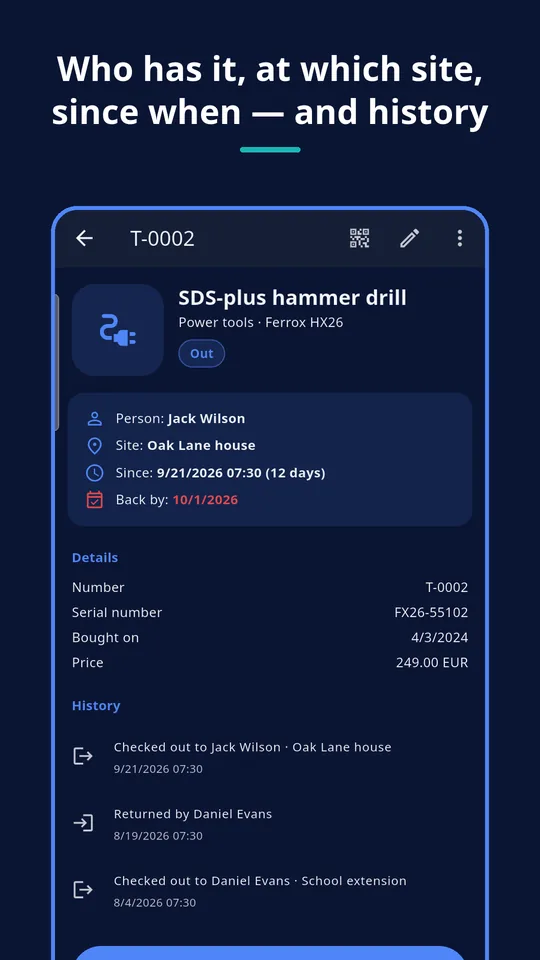
Added, checked out, returned, status changes, service done — each with a date, so nothing is left to memory.
Inspection dates on record help with workplace safety checks of power tools, ladders and harnesses, and a list with serial numbers and photos helps with an insurance claim or a police report after theft. The app keeps the record; it does not certify anything.
From the van to the report
Check-out and return
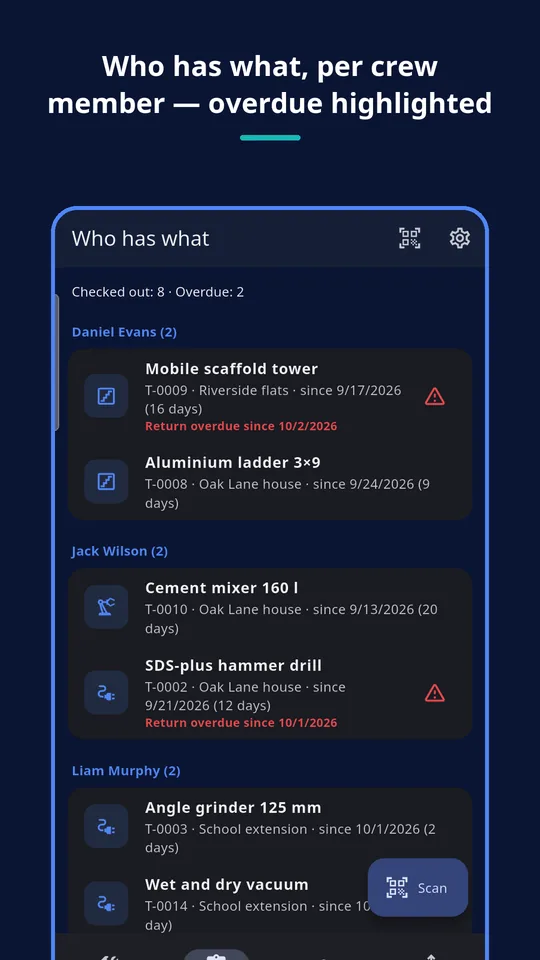
Pick the person and the site, add a “back by” date if you like. Overdue returns are highlighted in the lists.
QR codes and scanning
Every item has a QR code. Scan the label with the phone camera and the item opens — check it out or in with two taps.
Label sheets for A4
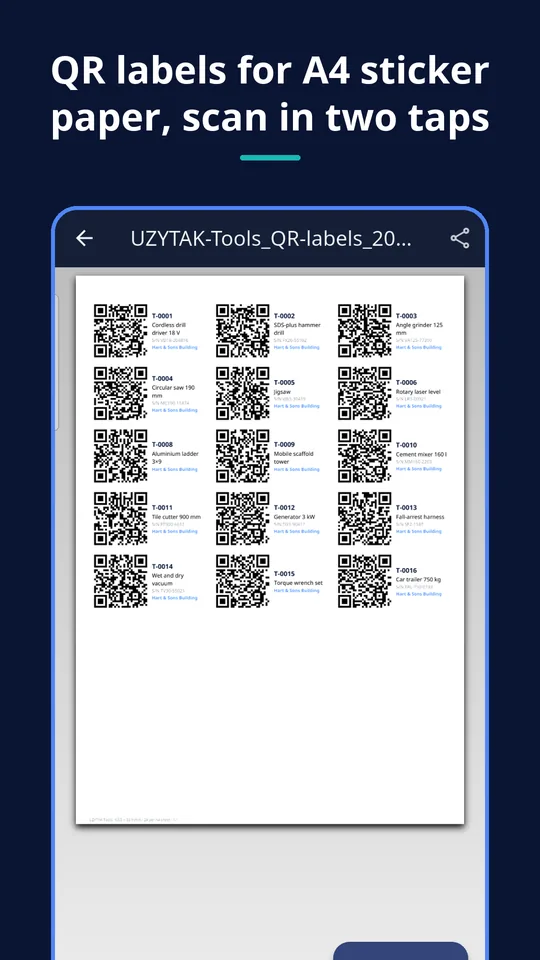
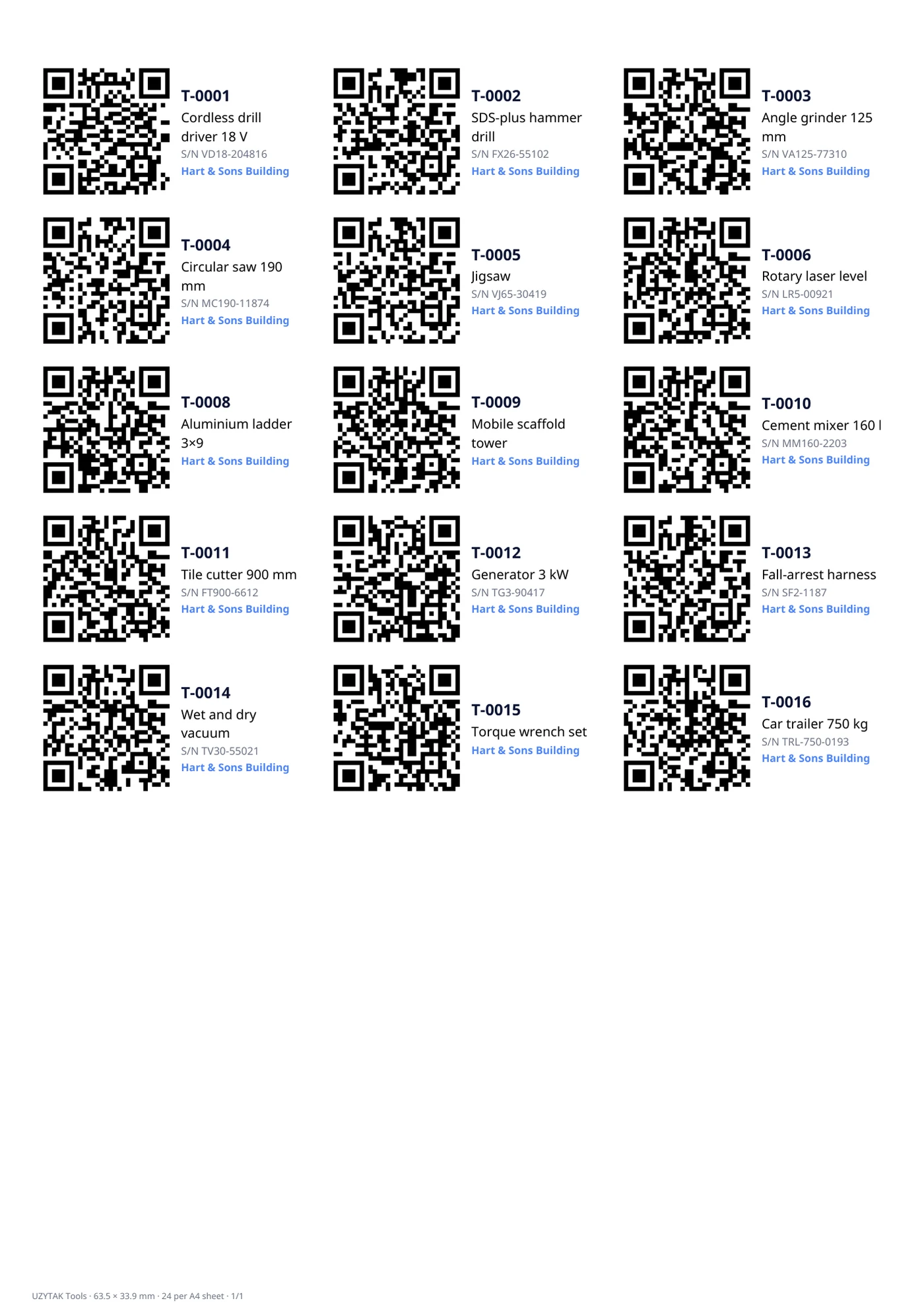
PDF sheets for A4 sticker paper in three sizes: small (65), medium (24) or large (10) labels per sheet.
Service and inspection dates
The next date and an optional interval in months. The home screen lists what is overdue or due in the next 30 days; “mark serviced” sets the next date.
Reports as PDF and CSV
Inventory with the total purchase value, who has what, per person, per site. The CSV opens in Excel or Google Sheets.
Backup in one ZIP
The whole register with photos as one file, shared wherever you like — to keep it safe or to move to a new phone.
Labels for every tool
The app prints the QR labels on standard A4 sticker sheets:
- small: 5 × 13 = 65 labels per sheet, for hand tools
- medium: 3 × 8 = 24 labels per sheet
- large: 2 × 5 = 10 labels per sheet, for machines and cases
- scanning a label in the app opens the item — no internet needed
PRO Label sheets, PDF/CSV reports and the backup export are part of Pro. The QR code on the screen and scanning are free.
How it works
Add your tools
Name, category, serial number, a photo — a few seconds per item. Then add your crew and your sites.
Print and stick labels
Print a QR label sheet on A4 sticker paper and put a label on every tool.
Scan to check out and in
Scan the label, pick the person and the site — done. When it comes back, scan again to return it.
Need time sheets too? Pair it with UZYTAK Time
UZYTAK Time records your crew's hours per site. Together with Tools you know who worked where — and which tools they had with them.
What the app does not do
- The register lives on one phone, for example the foreman's. There is no cloud and no sync between phones — your crew does not need the app.
- A second phone can get a copy by importing a backup, but changes made on two phones are not merged.
- No GPS tracking: the app records who took a tool and for which site, not where it is right now.
- A QR label can be torn off or painted over — then print a new one; the item keeps its number.
- No push notifications: the due-soon list is on the home screen when you open the app.
- The free version holds up to 25 items; for more you need Pro.
We would rather say it plainly than sell you something that does not fit.
Free vs. Pro
| Free | Pro | |
|---|---|---|
| Items (tools, equipment, machines) | up to 25 | unlimited |
| Crew, sites, check-out and return, history | ✓ | ✓ |
| QR code on the screen and scanning | ✓ | ✓ |
| Service dates and the due-soon list | ✓ | ✓ |
| Lists on the screen: who has what, per person, per site | ✓ | ✓ |
| Import a backup | ✓ | ✓ |
| QR label sheets (PDF, A4) | — | ✓ |
| Reports as PDF and CSV | — | ✓ |
| Backup export (ZIP) | — | ✓ |
| Price | free | €9.99 once |
Nothing you enter is locked: all items, people, sites and history stay in the app, and importing a backup works in the free version too.
Built for our own crew first
Every UZYTAK app starts as a tool our own company needs in its everyday work. On our sites tools kept going missing: a grinder left at the last job, a laser nobody remembered taking, a ladder that turned up months later at another site. Spreadsheets were never up to date, and the tool apps we tried wanted a monthly fee for every person and an account in the cloud. Tools is what we made instead: one phone, a QR label on every tool, and two taps to know who has it. We use it ourselves, and now you can too.
UZYTAK
Pay once. Use forever.
Tool tracking services usually charge a monthly fee per user and want your data in their cloud. UZYTAK Tools has no ads, no account and no per-user fees: the free version covers up to 25 items, and Pro is a single payment in Google Play — no subscription, updates included. Google Play shows the price in your currency.
Free
- Up to 25 items
- Check-out, return, history and QR scanning
- Service dates and on-screen lists
Pro
- Unlimited items
- QR label sheets, PDF and CSV reports
- Backup export
Like the app? Buy the team a coffee
UZYTAK is made by a small team of young developers. A small tip by card, PayPal or crypto keeps the free version free and without ads — coffee and croissants included.
Questions and answers
Does my crew need the app?
No. The register lives on one phone, usually the owner's or the foreman's. Crew members are just names in the list; they need no app and no account.
Can two phones share the data?
Not live: there is no cloud and no sync. You can export a backup and import it on a second phone to get a copy, but changes made on both phones are not merged — keep one phone as the main one.
What happens after 25 tools?
The free version holds up to 25 items. To add more, buy Pro once; everything you have entered stays as it is.
Which label paper do I need?
Standard A4 self-adhesive sheets with 65 (5 × 13), 24 (3 × 8) or 10 (2 × 5) labels per sheet. For tools that get wet or dirty, weatherproof label sheets last longer.
Does it work offline?
Yes, completely. Scanning, check-out, reports and backups work without internet; there is no account and no server.
Is Pro a subscription?
No. Pro is one payment in Google Play: €9.99, or the price Google Play shows in your currency. No per-user fees, updates included.
Does the app track where my tools are?
No. It has no GPS and asks for no location. It records who took a tool, for which site and when — not where the tool is right now.
Where is my data stored?
Only on your phone; UZYTAK receives nothing. The backup ZIP, PDFs and CSV files leave the phone only when you share them yourself.
Register, labels and reports are made on your phone, offline · support@uzytak.com · Privacy Policy