



Android app · UZYTAK Time
Your crew’s hours on one phone — a timesheet for every worker
Tap who started and on which site, tap who finished. At the end of the month you have a timesheet per worker for payroll and the hours per site for the invoice — without accounts for your workers and without a fee per person.
- Free for 2 people
- No subscription
- No fee per worker
- No ads, no account
- Data stays on the phone
★ Built first for our own company’s building crew
Android 8 or newer · Pro is a one-time purchase, no subscription
Inside the app
Made for people who pay by the hour
Crew leaders and foremen
A crew of 2 to 10 people, one phone. You clock everyone in and out, and at the end of the month every worker gets a sheet for the boss or the payroll office.
Self-employed tradespeople
You bill by the hour: the hours per site and client become an amount — and the text for your invoice, for example in UZYTAK Faktura.
Small employers
A simple, tidy record instead of paper notes on the dashboard — with corrections that are visible, not hidden.
What the app counts for you
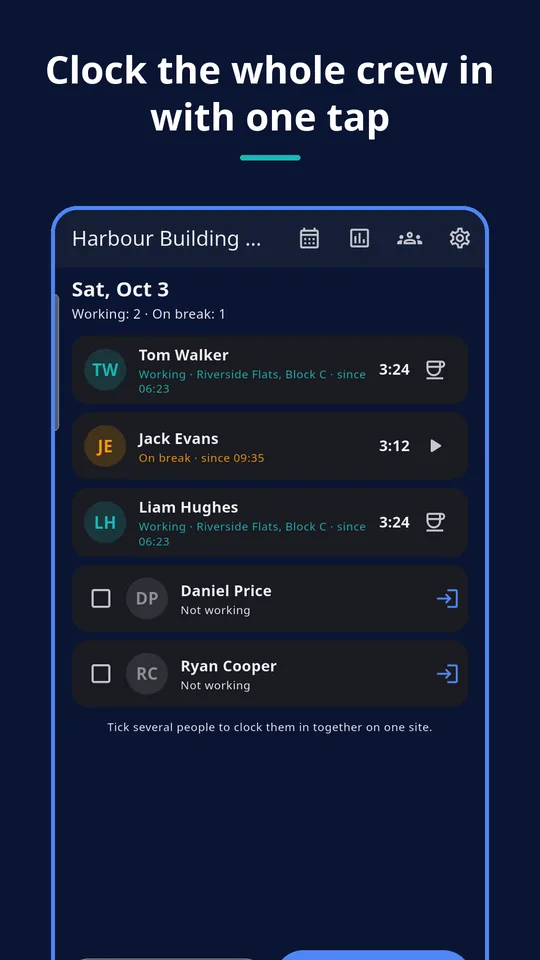
The whole crew with one tap
Tick several people and clock them in on one site together. Break for all, clock out all — or each person on their own.
Breaks and overtime
Breaks are subtracted; an automatic 30-minute break after 6 hours can be switched on. Overtime over a daily threshold (8 h by default) and an optional weekly one.
Night, Sundays, holidays
Night hours with an editable window, Sunday hours, Polish public holidays built in; other holidays you mark yourself. Shifts past midnight count on their start day.
Forgot to clock?
Add or fix a shift by hand. Every change of a saved shift asks for a reason and is printed on the timesheet, so nothing changes silently.
Absences
Vacation, sick leave, unpaid leave and other absences per person and day — counted on the sheet.
Hours × rate
Hourly rate per person or per site, optional overtime multiplier. Send the month’s hours per site as text to UZYTAK Faktura or any invoice app.
A timesheet your accountant understands
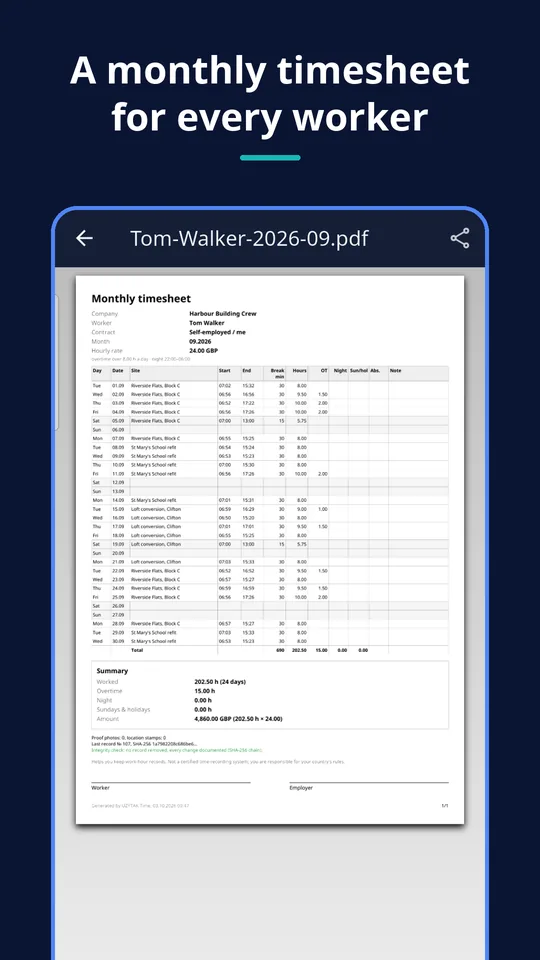
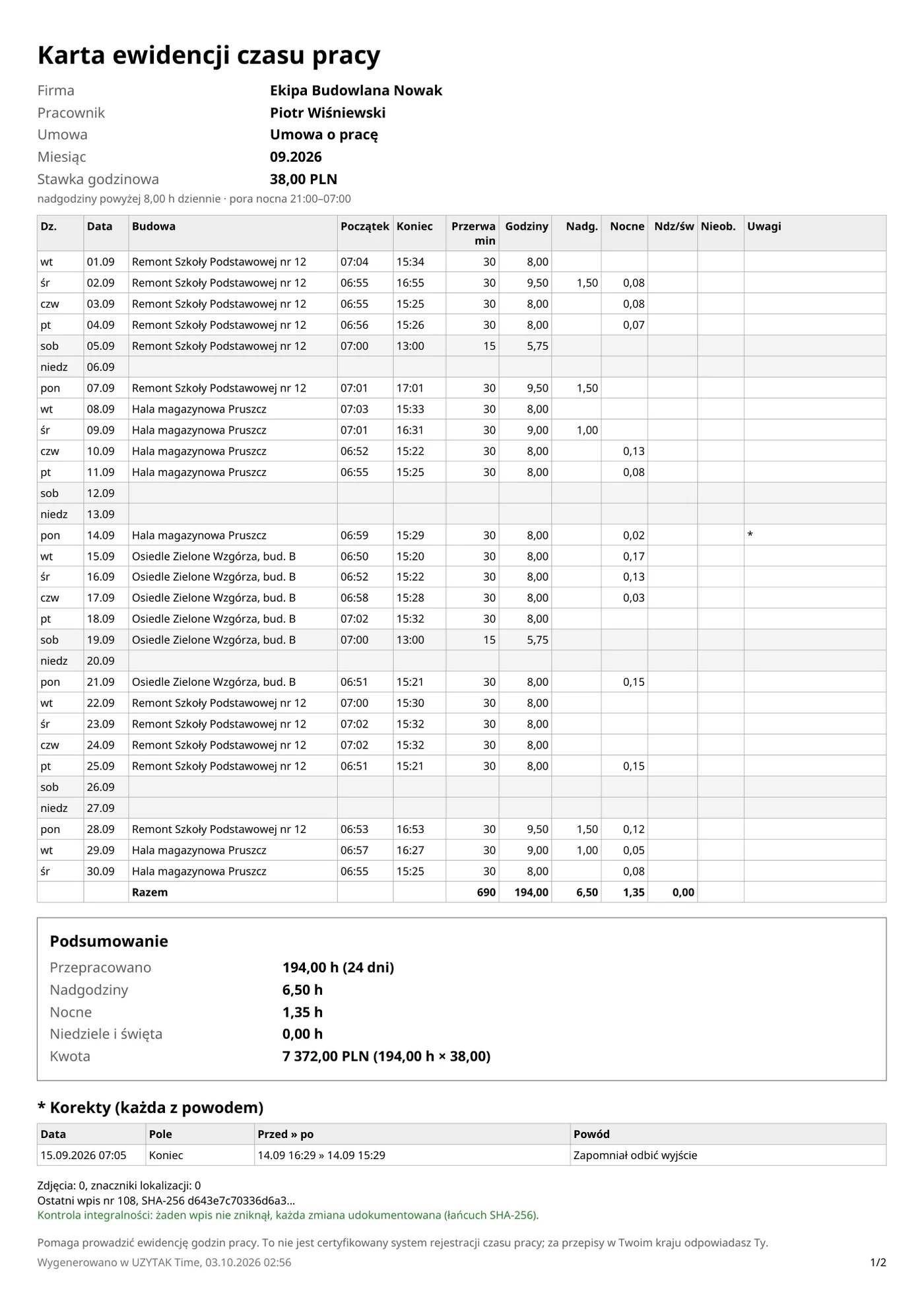
Every worker gets a monthly A4 PDF made on your phone:
- one row per day: site, start, end, break, hours
- overtime, night hours, Sundays and holidays, absences
- totals and, with Pro, rate and amount
- every correction with its reason, plus signature lines for worker and employer
- CSV for Excel and one ZIP with everything for the accountant
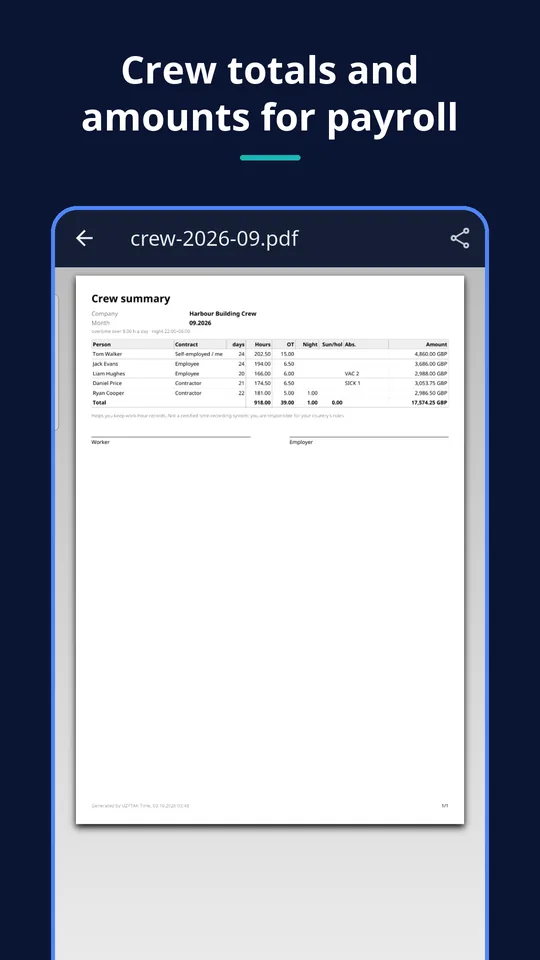
PRO Crew summary, site report for the client, every past month, CSV and ZIP are part of Pro.
Proof only when you tap
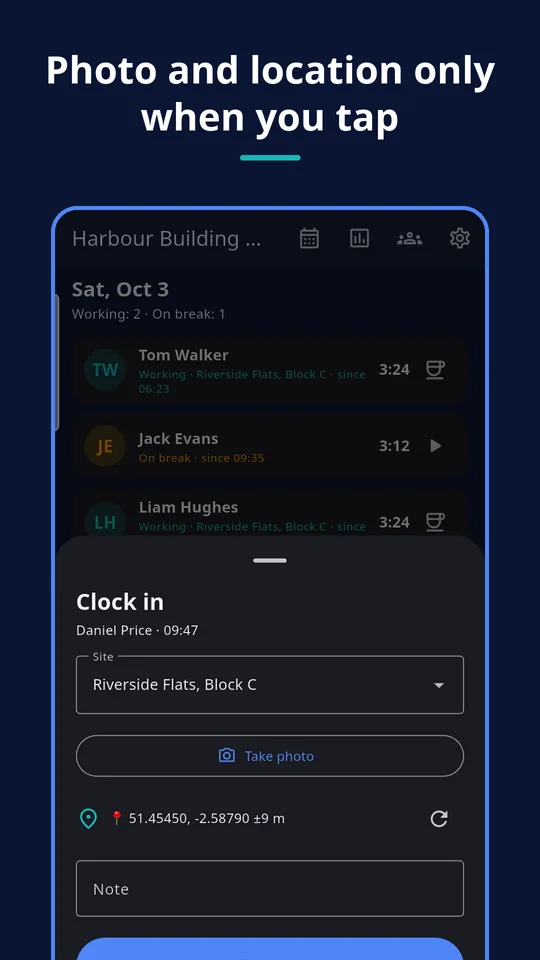
Some clients and bosses want to see that the crew really was on site. UZYTAK Time can add proof — but only at the moment you clock someone in or out, and only if you switch it on.
One photo
Taken with your phone’s camera app at clock-in or clock-out, stored small on the phone and shown as a thumbnail.
One location stamp
Coordinates and accuracy at that moment, with an “open in maps” link. No address lookup, no internet needed.
Never in the background
The app does not track anyone. No background location, no route, no geofence.
Stays on the phone
Photos and coordinates are saved only on your phone and leave it only when you share a file yourself.
Photo and location are off by default. If you record other people, tell them, and ask for their consent where the law requires it.
How it works
Add your crew
Enter the people with their hourly rate and the sites you work on. Two people are free.
Tap in and out
In the morning clock in the crew on a site, at lunch give everyone a break, in the evening clock them out.
Send the month
Share each worker’s timesheet PDF — and with Pro the crew summary, site reports, CSV and ZIP.
Every worker on their own phone?
UZYTAK Time is deliberately one phone with no accounts and no sync. If each worker should log in on their own phone, with photo reports and a manager view in the browser, that is UZYTAK Field Teams.
What the app does not do
- It is not a certified time-recording system. It helps you keep work-hour records; you remain responsible for the record-keeping rules in your country.
- It is not tax, payroll or legal advice: check with your accountant or payroll office what your records must contain.
- Everything is on one phone. Make a backup ZIP regularly and keep it somewhere safe — if the phone is lost without a backup, the data is gone.
- No cloud and no sync between phones. Workers do not get their own app logins.
- No background tracking, no geofences and no reminders.
- Public holidays are built in for Poland only; other holidays you mark by hand.
We would rather say it plainly than sell you something that does not fit.
Free vs. Pro
| Free | Pro | |
|---|---|---|
| People | 2 | unlimited |
| Sites | unlimited | unlimited |
| Clock in/out, breaks, absences, corrections | ✓ | ✓ |
| Optional photo and location stamp | ✓ | ✓ |
| Backup ZIP | ✓ | ✓ |
| Worker timesheet PDF | current month | any month |
| Crew summary and site report PDF | — | ✓ |
| CSV and ZIP for the accountant | — | ✓ |
| Rates and amounts on PDF and CSV | in the app only | ✓ |
| Price | free | €14.99 once |
Hours you have recorded are never locked: if you stop at Free, everything stays readable in the app.
Built for our own work first
Every UZYTAK app starts as a tool our own company needs in its everyday work. On our building sites the hours used to be written on paper and added up at the end of the month — with gaps and arguments. Time is the tool we made for that: one phone, the whole crew, and a clean sheet for everyone at the end of the month. We use it ourselves, and now you can too.
UZYTAK
Pay once. Use forever.
Most crew time apps charge a monthly fee for every worker. UZYTAK Time is free for 2 people, and Pro is a single payment in Google Play — no subscription, no fee per worker, updates included. Google Play shows the price in your currency.
Free
- 2 people, unlimited sites
- Clock, breaks, photo, location, backup
- Timesheet PDF for the current month
Pro
- Unlimited people
- Any month, crew summary and site reports
- CSV and ZIP, rates and amounts on the PDF
Like the app? Buy the team a coffee
UZYTAK is made by a small team of young developers. A small tip by card, PayPal or crypto keeps the free version free and without ads — coffee and croissants included.
Questions and answers
Is UZYTAK Time really free?
Yes, for 2 people — for example you and one worker — with unlimited sites, the clock, breaks, absences, corrections, photo and location stamps, backup and the timesheet PDF of the current month. Pro is an optional one-time purchase.
Is Pro a subscription?
No. Pro is one payment in Google Play: €14.99, or the price Google Play shows in your currency. You pay once and keep it, with updates. There is no fee per worker.
Do my workers need the app or an account?
No. The crew leader clocks everyone in and out on one phone. Workers need neither the app nor an account. If every worker should use their own phone, look at UZYTAK Field Teams.
Where is my data stored?
Only on your phone. There is no account and no cloud, and UZYTAK receives nothing. Data leaves the phone only when you share a PDF, CSV or backup ZIP yourself.
What if I lose my phone?
Make a backup ZIP in Settings regularly and keep it in your cloud drive or send it to yourself by email. The app shows when the last backup was made. On a new phone you restore the ZIP.
Does the app track my workers?
No. There is no background location. A photo or a location stamp is taken only at the moment of clocking in or out, and only if you switch it on.
Is it an official time-recording system?
No. It helps you keep work-hour records with visible corrections, but it is not a certified system. Check with your accountant or payroll office what your country requires.
Which phones are supported?
Android 8 or newer.
PDFs and calculations are made on your phone, offline · support@uzytak.com · Privacy Policy