



Windows app · UZYTAK Viewer
View every photo and video format: HEIC, RAW, AVIF, JPEG XL, PSD, MP4, MKV
UZYTAK Viewer opens every photo and every video on your PC — fast, with no extra codec packs.
Everything stays on your PC. No account, no cloud, no tracking. 10 languages.
- HEIC, RAW, AVIF, MP4, MKV
- Free, no ads
- No account
- Works offline
- 10 languages
Windows 10 and 11 · your photos stay on your PC
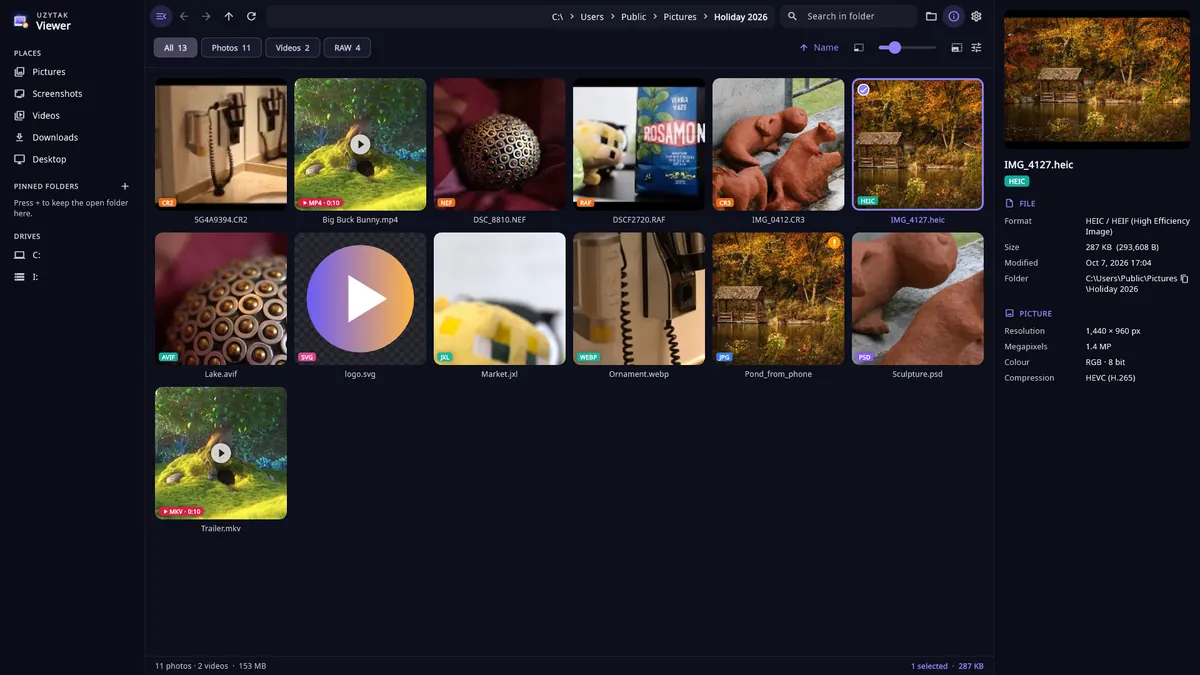
One viewer for all your photos and videos
Photos from phones and cameras, pictures from the web and design programs, and videos open in the same window. No codec packs and no paid extensions to install.
Photos and pictures
- JPEG
- PNG
- HEIC / HEIF
- AVIF
- WebP
- GIF
- JPEG XL
- TIFF
- JPEG 2000
- BMP
- ICO
- PSD
- TGA
- EXR
- HDR
- SVG
Camera RAW
- Canon CR2 / CR3
- Nikon NEF
- Sony ARW
- Fujifilm RAF
- Panasonic RW2
- Olympus ORF
- DNG
- Pentax PEF
Video
- MP4
- MOV
- MKV
- WebM
- AVI
- WMV
- MTS / M2TS
- TS
- MPG
- 3GP
- FLV
Video codecs
- H.264
- H.265 / HEVC
- AV1
- VP9
- ProRes
What you can do
Every photo format
JPEG, PNG, HEIC/HEIF from iPhone (no paid extension needed), AVIF, WebP, GIF, JPEG XL, TIFF, JPEG 2000, BMP, ICO, PSD, TGA, EXR, SVG.
RAW from every camera
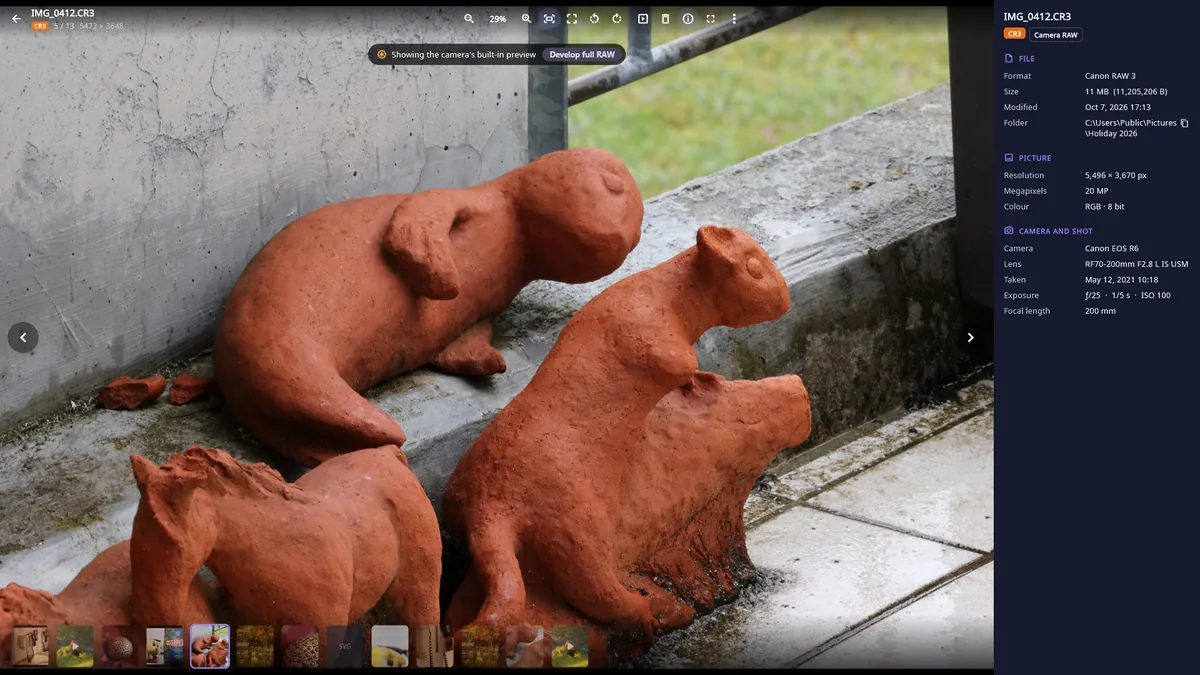
Canon CR2/CR3, Nikon NEF, Sony ARW, Fujifilm RAF, Panasonic RW2, Olympus ORF, DNG — instant preview, full development on demand.
Video player
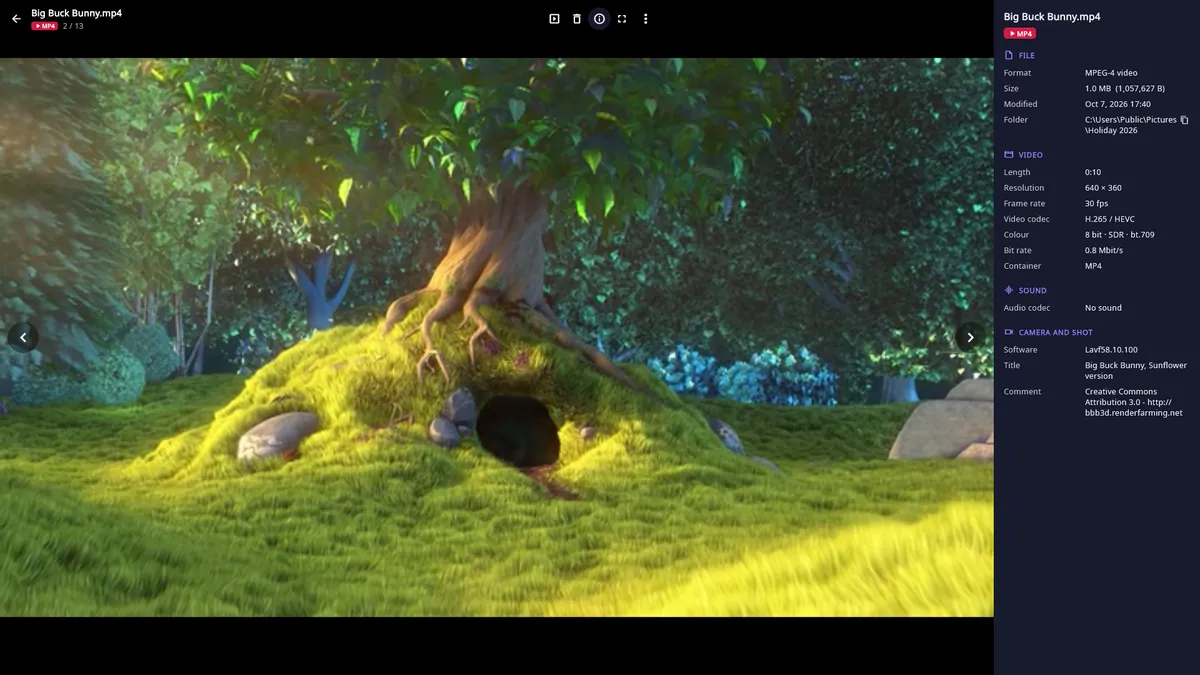
MP4, MOV, MKV, WebM, AVI, WMV, MTS, H.265/HEVC, AV1 — with speed, frame-by-frame and repeat.
Everything about the file
Resolution, colour profile, bit depth, camera, lens, exposure, ISO, date taken, GPS place on the map, video codec, HDR, bit rate, sound.
Real format, right name
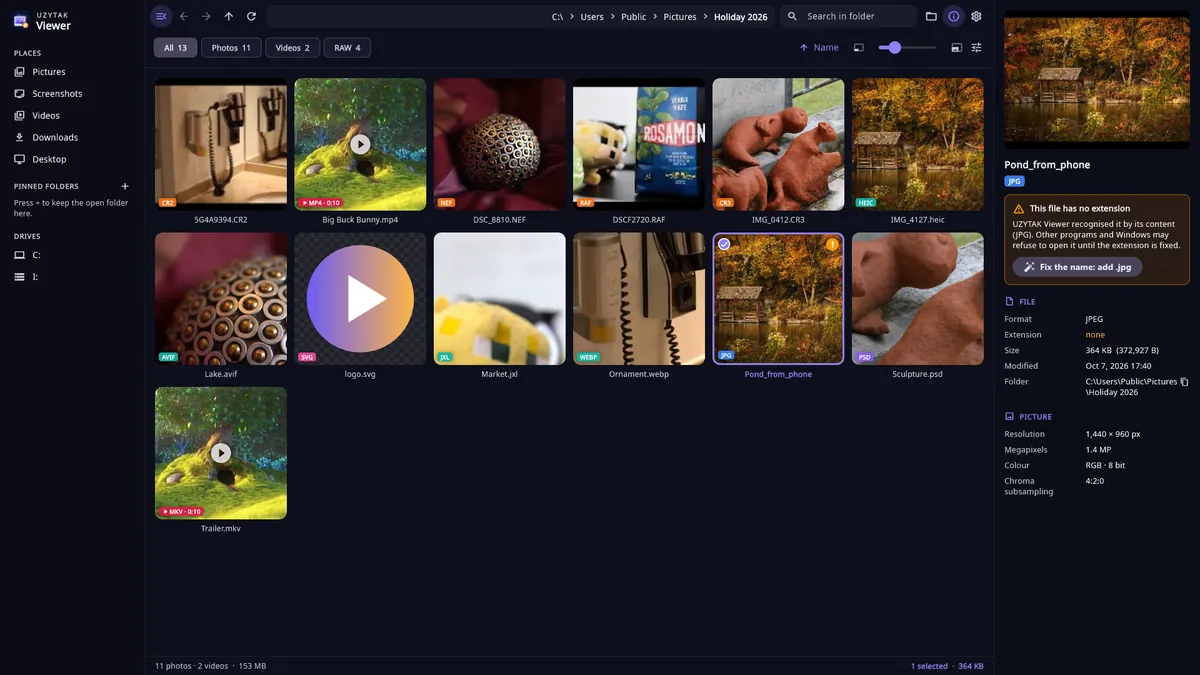
Recognises the format by its content: files with no or the wrong extension are found and fixed in one click.
Folders and viewing
Folders, thumbnails, search, filters, full screen, slideshow, zoom up to 6400%, Recycle Bin, desktop background.
Inside the app
How it works
1. Open a folder
Pick Pictures, Screenshots, Videos, Downloads or any folder on the left, or drag a folder or a file into the window. Thumbnails show the format and the video length.
2. View
Double-click a photo or video. Zoom with the mouse wheel up to 6400%, move along the filmstrip, start a slideshow or go full screen.
3. Check and fix
The details panel shows the camera, exposure, colour profile, GPS place and video codec. Files with a missing or wrong extension get an orange flag and are fixed with one click.
Good to know
- UZYTAK Viewer is a Windows app for Windows 10 and Windows 11.
- HEIC/HEIF photos from an iPhone and H.265 videos open without the paid Microsoft extensions — the decoders come with the app.
- RAW files first show the camera's own embedded preview at once; the full development from the sensor data runs when you ask for it.
- It is a viewer: rotating only changes how a photo is shown. The file is renamed only when you press “Fix the name”, and deleting moves files to the Recycle Bin.
- Everything works offline. Files are read from your PC only when you open a folder or a file — nothing is uploaded, and there is no cloud.
- To open files with a double-click: right-click a photo or video → “Open with” → UZYTAK Viewer.
Free
UZYTAK Viewer is free: all formats and all features, with no ads, no account, no time limit and no paid add-ons.
Coming to Microsoft StoreYour photos stay on your PC
UZYTAK Viewer works offline. There is no account, no ads, no analytics and no telemetry. Photos and videos are read only on your PC when you open them and are never uploaded; thumbnails and settings stay in the app's folder on your PC. Only “Show on the map” opens OpenStreetMap in your browser, and only when you click it.
Questions or ideas?
Write to us — a small team answers in your language and adds what users ask for, including formats we do not open yet.
Questions
Which formats does UZYTAK Viewer open?
Photos: JPEG, PNG, HEIC/HEIF, AVIF, WebP, GIF, JPEG XL, TIFF, JPEG 2000, BMP, ICO, PSD, TGA, EXR, HDR and SVG. Camera RAW: Canon CR2/CR3, Nikon NEF, Sony ARW, Fujifilm RAF, Panasonic RW2, Olympus ORF, DNG, Pentax PEF and more. Video: MP4, MOV, MKV, WebM, AVI, WMV, MTS/M2TS, TS, MPG, 3GP and FLV with H.264, H.265/HEVC, AV1, VP9 and ProRes.
Do I need the HEIF or HEVC extension from Microsoft?
No. iPhone photos (HEIC) and H.265 videos open in UZYTAK Viewer without any paid extension — the decoders come with the app.
Is it really free?
Yes. Every format and every feature is free, with no ads, no account and no time limit. There are no paid add-ons.
Are my photos uploaded anywhere?
No. Photos and videos are read only on your PC when you open them. The app has no account, no cloud, no analytics and no telemetry. Only if you click “Show on the map” does your browser open OpenStreetMap with that photo's coordinates.
Does the app change my files?
Only when you ask. Rotating changes only the view. “Fix the name” renames a file, deleting moves it to the Recycle Bin, and “Set as desktop background” changes your wallpaper — each only after your click.
What does the orange flag on a thumbnail mean?
The file's content does not match its name: the extension is missing or wrong (for example a JPEG saved as .png or a photo with no extension). UZYTAK Viewer still opens it, and “Fix the name” adds the right extension so other programs can open it too.
Which Windows versions are supported?
Windows 10 and Windows 11. Everything the app needs comes with it, so there is nothing extra to install.
UZYTAK Viewer · Windows · support@uzytak.com · Privacy Policy