



Windows app · UZYTAK Haft
Picture to embroidery file — in one click
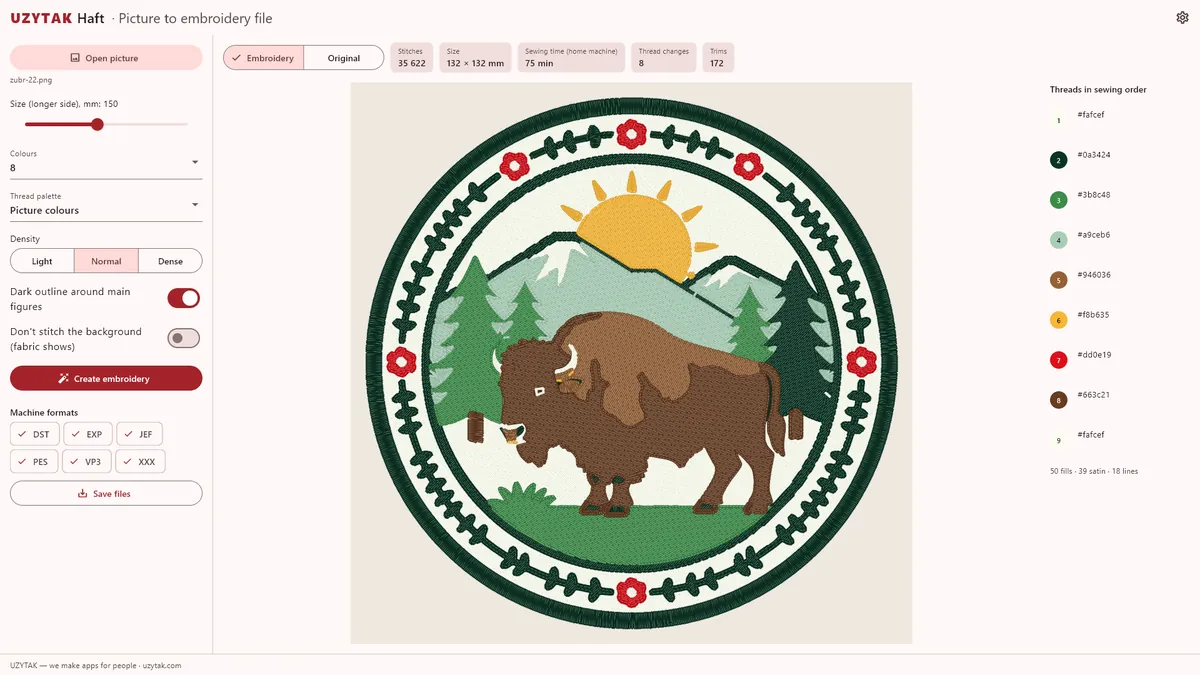
Open a logo or a picture, choose the size, and UZYTAK Haft makes a ready file for your embroidery machine. Before you sew, you see a realistic preview on fabric, the number of stitches, the threads in sewing order and how long the machine will work.
- DST and PES free
- Own stitch engine
- Preview on fabric
- No account, no cloud
- 23 languages
Windows 10 and 11 · everything runs on your PC
Original and embroidery
Real results of the app: on the left the picture, on the right the preview of the stitches it made.
 Original
 Embroidery
 Original
 Embroidery
Preview images are made by the app. On real fabric the result also depends on the fabric, stabiliser, threads and machine.
What it does
Own stitch engine
Tatami fills with underlay and pull compensation, satin columns for borders and letters, running stitch for thin lines.
Clean flat areas
One stitch direction per colour on flat areas and as few jumps and trims as possible.
Colours like the picture
The app finds the picture's colours, keeps small details like eyes, and matches Brother or Janome threads.
Preview on fabric
A realistic preview next to the original, so you see the result before the machine starts.
Numbers before sewing
Stitch count, thread changes, trims, size and sewing time on a home machine.
Machine formats
DST (Tajima) and PES (Brother) free; EXP, JEF, VP3 and XXX with Pro.


How it works
1. Open a picture
PNG, JPG, BMP or WEBP. Logos, coats of arms and badges with flat colours give the best result.
2. Choose size and colours
The longer side in millimetres and the number of colours (or automatic). The app makes the stitches in seconds.
3. Check and save
Compare the preview with the original, look at the numbers, and save the files for your machine.
Free and Pro
| Free Free, forever | Pro €29.99 · Pay once, no subscription | |
|---|---|---|
| Picture to embroidery, preview, numbers | ✓ | ✓ |
| Design size | up to 100 mm | up to 300 mm |
| Colours | up to 6 | up to 12 |
| DST and PES files | ✓ | ✓ |
| EXP, JEF, VP3, XXX files | — | ✓ |
| Brother thread palette | ✓ | ✓ |
| Janome thread palette | — | ✓ |
| Density: light, normal, dense | — | ✓ |
Pro is a one-time add-on in the Microsoft Store: €29.99, no subscription. The Store shows the price in your currency.
Good to know
- UZYTAK Haft is a Windows app for Windows 10 and Windows 11.
- Best results come from logos, coats of arms, badges and pictures with flat colours and clear shapes. Photos with soft shading are simplified to flat colour areas.
- The preview is a picture made by the app. Before a big order, sew one test piece: fabric, stabiliser and machine settings change the result.
- Everything runs on your PC. Pictures and embroidery files are never uploaded.
Your pictures stay on your PC
UZYTAK Haft works offline. There is no account, no ads, no analytics and no telemetry. Your pictures and embroidery files stay on your PC; the app only reads the picture you open and writes the files where you save them.
Questions or wishes?
Write to us — a small team answers in your language, fixes bugs quickly and adds what users ask for.
Questions
Which embroidery machines does it work with?
With machines that read DST (Tajima and most industrial machines) or PES (Brother, Babylock) — both free. Pro adds EXP (Melco, Bernina), JEF (Janome), VP3 (Husqvarna Viking, Pfaff) and XXX (Singer).
Is UZYTAK Haft free?
Yes: picture to embroidery, the preview and the numbers, designs up to 100 mm and 6 colours, DST and PES files. Pro costs €29.99 once in the Microsoft Store and adds designs up to 300 mm, up to 12 colours, all formats, the Janome palette and density settings.
What pictures give the best result?
Logos, coats of arms, badges, emblems and drawings with flat colours and clear edges. Photos and soft gradients are simplified to a few flat colours.
Do I need an account or the internet?
No. Everything runs on your PC, without an account and without a connection. Only buying Pro goes through the Microsoft Store.
Can I sew the file right away?
Yes, the files are ready for the machine. As with any embroidery, sew one test first on the same fabric with a stabiliser.
How is the sewing time calculated?
From the stitch count at the speed of a typical home machine, plus thread changes. Industrial machines sew faster.