



Android app · UZYTAK Punch List
Every defect photographed, marked and followed up
Walk through the rooms, take a photo of each defect, draw an arrow or circle on it, say who must fix it and by when. Later mark it fixed, add the “after” photo, accept it — and send a clean PDF report to the contractor or the client.
- Free: 2 projects with 15 defects each
- No subscription
- No ads, no account, no cloud
- Works offline
- Data stays on the phone
★ Pay once, keep it
Android 8 or newer · Pro is a one-time purchase, no subscription
The app is being published. This page is already open; the Google Play button will appear here when the app is live.
Inside the app
Made for the final walkthrough
Contractors and site managers
Walk the building with the client, list what is left, give each trade its own list with a deadline.
Developers, property managers, inspectors
A clear defect protocol for every flat: photos, status and a report you can send the same day.
Home owners taking over
Buying a new flat or house? Photograph every flaw at the handover and hand the list over before you accept.
From project to accepted defect
A project holds its address, client, contractor, inspector and date. Inside it you work room by room, and every defect carries everything the person who repairs it needs.
Project
Address, client, contractor, inspected by, inspection date. Two projects are free, Pro has no limit.
Rooms and areas
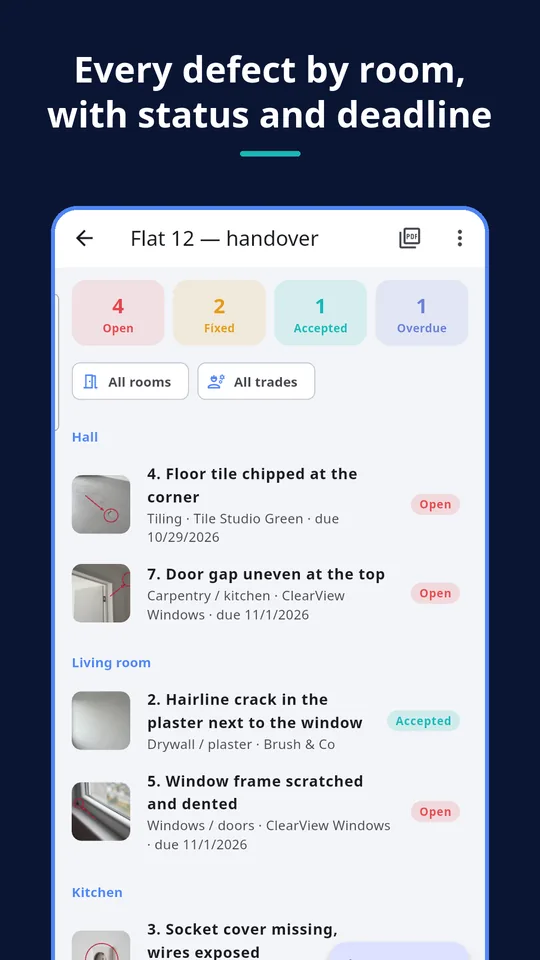
Hall, kitchen, bathroom, bedroom, balcony, outside — or your own names. Defects are grouped by room.
Defect
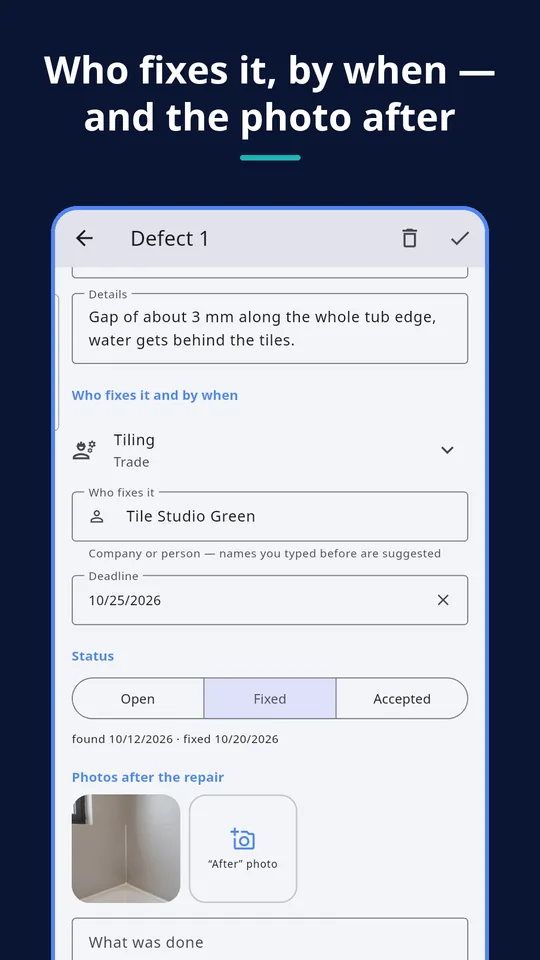
Photos, short text, details, trade, who fixes it and the deadline. Overdue defects are highlighted.
Status
Open, fixed, accepted, each with its date, and an “after” photo of the repair next to the original.
Filter by status, overdue, room or trade — for example everything still open for the electrician.
What is inside
Marks on the photo
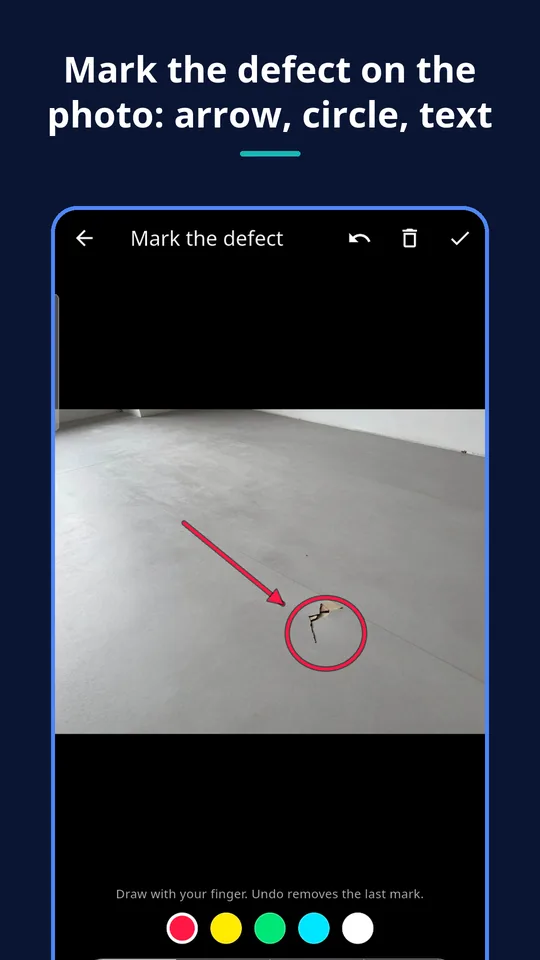
Draw arrows, circles, free lines and text labels in strong colours. The original photo stays untouched.
Trade and who fixes it
Sort the list by trade and send each company only its own defects.
Deadlines that show
An overdue defect is highlighted in the list and in the report.
After photos
When a defect is fixed, add the “after” photo; the report shows before and after side by side.
CSV for Excel
Export the whole list to Excel or Google Sheets for your own checks.
ZIP backup
All projects and photos in one file; import it on a new phone. Import is always free.
A report the contractor can act on
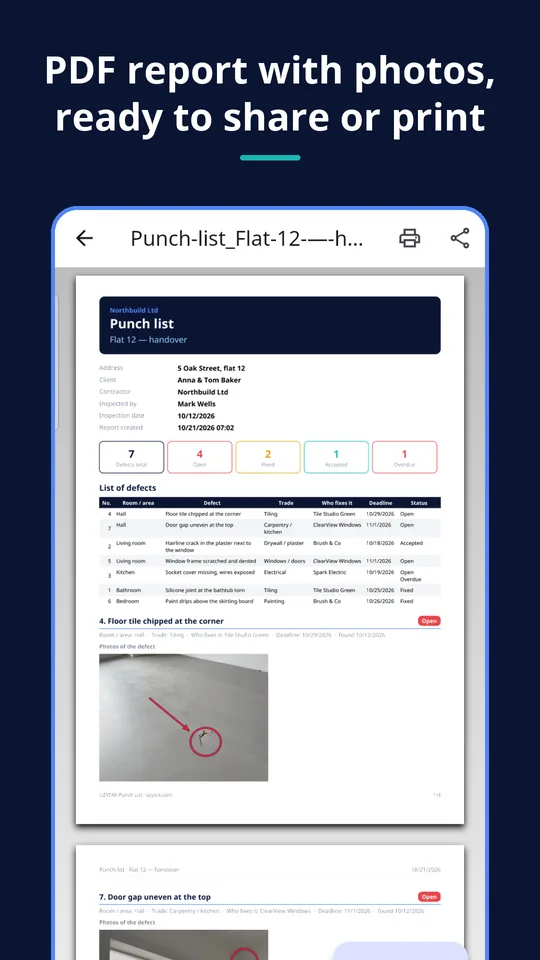
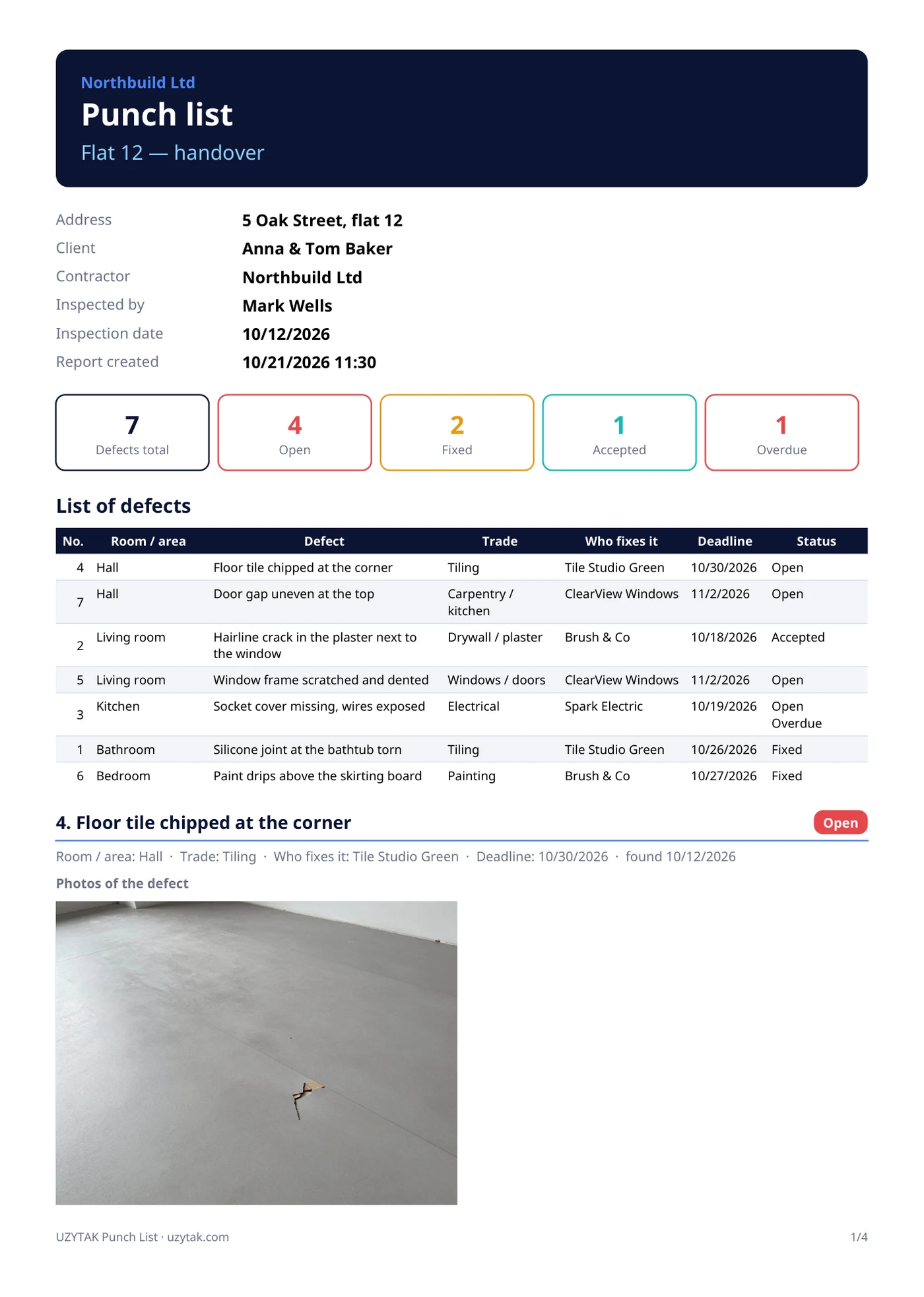
Every report is a clean A4 PDF:
- cover with project data and a summary of open, fixed, accepted and overdue defects
- table of all defects: room, trade, who fixes it, deadline, status
- photos of each defect, and the “after” photo of the repair next to it
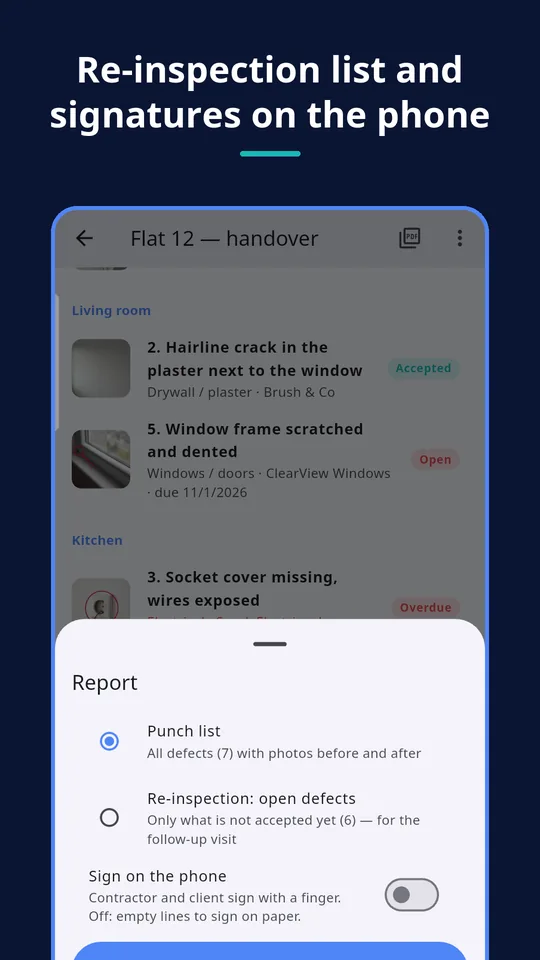
- re-inspection PDF with only what is not accepted yet, for the follow-up visit
- signatures of contractor and client on the phone, or empty lines to sign on paper
PRO Pro lets you share and print the PDF, makes the re-inspection list, signatures, CSV and the backup export. Free shows a watermarked preview.
How it works
Create a project
Address, client, contractor and the date of the walkthrough.
Walk and photograph
Room by room: photo, mark, a few words, trade, who fixes it and the deadline.
Follow up and report
Mark defects fixed and accepted, add after photos, send the PDF, and run the re-inspection with the short list.
Walkthrough done? Close the job with UZYTAK Handover
After the defects are fixed, UZYTAK Handover writes the acceptance protocol, signed by both sides on the screen. The punch list tells you what is wrong; Handover records the handover.
What the app does not do
- One phone holds the list: there is no cloud sync and no team accounts. To work on another phone, import a ZIP backup.
- The report documents defects; it is not a contract, a legal opinion or an expert survey. Warranty claims and deadlines depend on your country and contract.
- No server sends e-mail for you: you share the PDF yourself, by e-mail, WhatsApp or any app, or print it.
- No camera permission is requested: photos come from your phone's camera app or the photo picker.
- It is not a full site-management system: no schedules, budgets or invoices.
We would rather say it plainly than sell you something that does not fit.
Free vs. Pro
| Free | Pro | |
|---|---|---|
| Projects | 2 | unlimited |
| Defects per project | 15 | unlimited |
| Photos with marks, rooms, trades, deadlines | ✓ | ✓ |
| Statuses, filters, after photos | ✓ | ✓ |
| PDF preview with a watermark | ✓ | ✓ |
| PDF report to share and print | — | ✓ |
| Re-inspection PDF and signatures | — | ✓ |
| CSV and backup export (import is free) | — | ✓ |
| Price | free | €9.99 once |
Nothing you entered is ever locked: your data and photos stay in the app, and a backup can always be imported.
Why a punch list of our own
Handing over a building ends the same way everywhere: a notebook, photos lost in the gallery, a spreadsheet nobody updates, and an argument about what was agreed. Punch List keeps one list with the photo, the mark, the person and the date for each defect — and the PDF is one tap away. It works in a basement without signal, needs no account and keeps your photos on your phone.
UZYTAK
Pay once. Use forever.
Many defect-list apps want a monthly subscription, an account and your photos in their cloud. UZYTAK Punch List has no ads and no account; the free version already handles two real projects, and Pro is a single payment in Google Play, updates included. Google Play shows the price in your currency, with VAT where it applies.
Free
- 2 projects with 15 defects each
- Photos with marks, statuses, filters, after photos
- PDF preview with a watermark
Coming to Google Play
Pro
- Unlimited projects and defects
- PDF reports to share and print, re-inspection list, signatures
- CSV and backup export
Coming to Google Play
Like the app? Buy the team a coffee
UZYTAK is made by a small team of young developers. A small tip by card, PayPal or crypto keeps the free version free and without ads.
Questions and answers
Is UZYTAK Punch List free?
Yes, up to 2 projects with 15 defects each, with photos, marks, statuses, filters and a watermarked PDF preview. Pro removes the limits and unlocks sharing and printing the PDF, the re-inspection list, signatures and exports.
Is Pro a subscription?
No. Pro is one payment in Google Play: €9.99, or the price Google Play shows in your country, with VAT where it applies. You pay once and keep it, updates included.
Where are my photos and defects stored?
Only on your phone, in the app's own folder. There is no account and no cloud, and UZYTAK receives nothing. A file leaves the phone only when you share it.
Does it need internet?
No. Everything works offline, also in basements and new buildings without signal.
Does the app need access to my camera or storage?
No. You take photos with your phone's camera app or pick them in Android's photo picker, so the app asks for no camera, storage, location or contacts permission.
Can two people work on the same list?
Not at the same time: there is no cloud sync. Make a ZIP backup on one phone and import it on another, or send each company its own PDF.
Which phones are supported?
Android 8 or newer. The app speaks 21 languages.
Defects, photos and PDFs stay on your phone, offline · support@uzytak.com · Privacy Policy